Fantasy console · v0.4
Make a game
in a box
of 128 pixels.
Sixteen colours, a sprite sheet, a tilemap and a sound tracker — with the whole editor drawn inside the framebuffer. What's different is the code you write: plain JavaScript, signatures you can guess, and collision, animation and particles already in the box.
Unzip, run .\run.ps1, and it opens. Or skip all that and use
the browser version — it's the same console.
Click the screen · ← → move · Z jump
128×128Screen
16Colours
256Sprites
64Sound effects
New in 0.4
The sample game is an actual game now — title screen, a real ending, and a four-channel chiptune written in the built-in tracker. Every screenshot on this page is a true 128×128 image upscaled by your browser, not a blown-up capture.
The editor is the console
Five tabs, all drawn in 128×128.
There's no window chrome hiding the machine. You boot to a command line, press ESC, and you're editing — code, sprites, level, sound and music, in the same pixels the game gets.
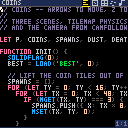
Code
Thirty-two columns of syntax-coloured text, with selection, undo and scrolling written from scratch — there's no textarea under it.
When a cart throws, the line is marked red in the gutter. Your line, not a stack trace through the engine.
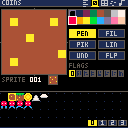
Sprites
256 sprites on a 128×128 sheet. Pen, fill, picker and line, with undo and eight flag bits per sprite.
Flag 0 is what the physics reads as a wall, so marking a tile solid is one click.
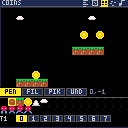
Map
A 128×64 tile grid you scroll around and paint. Fill, pick, undo.
Faint rules mark every sixteenth tile — exactly one screen — so you can lay out rooms by eye.
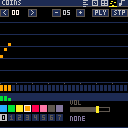
Sound
Thirty-two steps per effect. Drag across the pitch field to draw a melody; the strips underneath set waveform and volume.
Eight waveforms, eight effects, synthesised in the browser — no samples to ship.
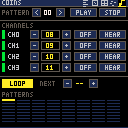
Music
A pattern is four sound effects played together. Chain them and you have a track.
Sixty-four patterns, four channels each.
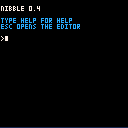
Console
Where you land. HELP, RUN,
SAVE, LOAD, EXPORT — with
history and scrollback.
Errors print here with the line number before dropping you back in the editor.
The API
Signatures you can guess.
a whole game
let p;

function init() {
  solidflag(0);          // tiles flagged 0 are walls
  p = body({ x: 60, y: 20, w: 8, h: 8,
             gravity: 400 });
}

function update(dt) {
  if (btn(LEFT))  p.vx = -60;
  if (btn(RIGHT)) p.vx =  60;
  if (btnp(A) && p.grounded) {
    p.vy = -160;
    sfx(0);
  }
  p.move(dt);          // sweeps the tilemap
}

function draw() {
  cls(12);
  map();
  spr(16, p.x, p.y);
}
rect(x, y, w, h) takes a width and a height, not two
corners. sin and cos are real radians.
spr() takes named options — { flipx: true }
— instead of four trailing flags. update(dt) gets
seconds, so movement doesn't break when the frame rate does.
The rest behaves the way a fantasy console should:
fillp patterns, pal, palt,
cartdata, sprite flags, eight waveforms.
Batteries, not boilerplate
body() does tilemap physics. anim() does
frames. tween(), particles(),
camfollow(), shake() and timers are all
there and driven for you.
No token limit
Write as much as you like. The constraint is the screen, not the source.
Shipping
Your game becomes one HTML file.
Nothing to host
Export inlines the engine, art, sound and code into a single page. No assets folder, no network requests, no build step. Email it, put it on a USB stick, or drop it on any static host.
Plays on anything
Exported games scale to the screen and grow an on-screen d-pad on phones and tablets. Keyboard and gamepad on a laptop. Same cart, no code changes.
Errors that point at your line
A thrown error reports the line in your cart, marked in the editor's gutter — not a trace through engine internals you didn't write.
Nothing to install
Plain scripts and a static server. The whole toolchain is a folder and a PowerShell script, and the browser version is one file.
Specs
The machine.
| Hardware | |
|---|---|
| Screen | 128 × 128, 16 colours |
| Sprites | 256 of 8×8 |
| Tilemap | 128 × 64 tiles |
| Sound | 64 × 32 steps, 8 waveforms |
| Music | 64 patterns, 4 channels |
| Frame rate | 60, fixed timestep |
| Practicalities | |
|---|---|
| Language | JavaScript |
| Exported game | ~145 kB, one file |
| Dependencies | none |
| Build step | none |
| Editor needs | a keyboard |
| Games run on | phone, tablet, laptop |
Getting started
Three steps, about a minute.
-
Download and unzip
Put the folder anywhere. Or skip this entirely and open the editor in your browser.
-
Run
.\run.ps1A static server with no dependencies. It opens the console for you. Any other static server works just as well.
-
Type HELP
The sample platformer is already loaded. ESC switches between console and editor, Ctrl+R runs, and
EXPORTgives you a page you can share.